

A GDPR-friendly workflow
This bundle alone won't ensure you follow the GDPR best practices. It will depend on how you will use it.
The key notion to understand and to keep in mind is:
Sensitive data should never transit on an unsecured environment.
Here is an example of workflow - that follows GDPR recommendations - to retrieve anonymized production data on your local environment.
Prerequisites
- You have a second secured environment besides your production and you can securely copy files from one to another. We will call it the intermediate environment,
- You can shut down your service on this intermediate environment,
- Your anonymization is well configured: every sensitive data has been mapped to an anonymizer that will erase/hash/randomize it.
The workflow
Let's assume the environment we have besides production is the preprod environment.
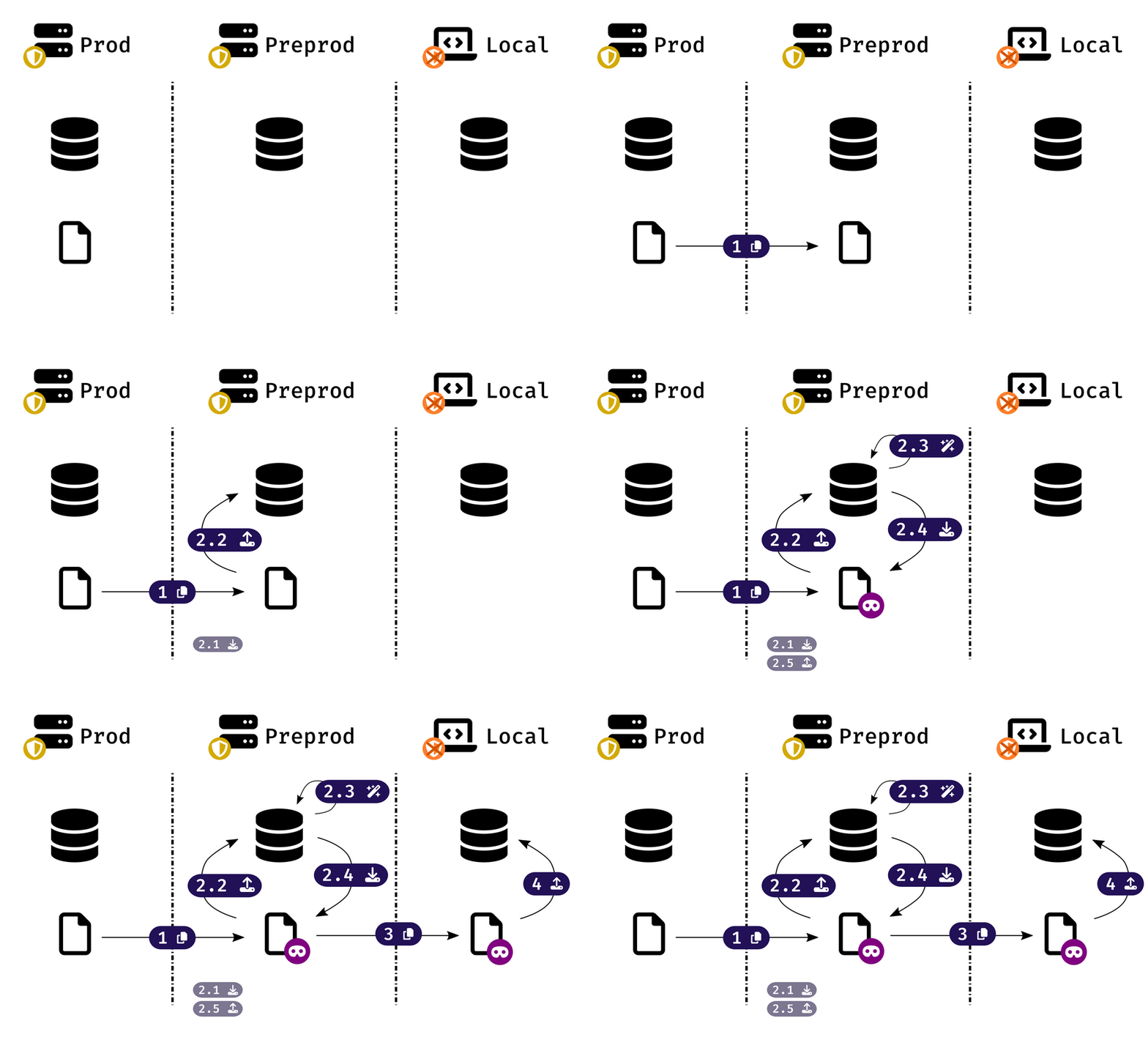
- Run
vendor/bin/db-tools backupphp bin/console db-tools:backupdocker compose run dbtools backupon production environment or choose an existing backup withvendor/bin/db-tools restore --listphp bin/console db-tools:restore --listdocker compose run dbtools restore --list, - Securely download your backup file from production to preprod environment, and stop services on preprod to ensure no one is using it,
- Run
vendor/bin/db-tools anonymize path/to/your/production/backupphp bin/console db-tools:anonymize path/to/your/production/backupdocker compose run dbtools anonymize path/to/your/production/backupto generate a new backup cleaned from its sensitive data, - Download the anonymized backup from preprod to your local machine
- Restore the backup with
vendor/bin/db-tools restore --filename path/to/your/anonymized/backupphp bin/console db-tools:restore --filename path/to/your/anonymized/backupdocker compose run dbtools restore --filename path/to/your/anonymized/backup
That's it: you now have fully anonymized data on your local environment. But sensitive data never passed through an unsecured environment!
Backup anonymization as a CI job
In the example above, we took the preproduction as our intermediate environment: it is a kind of universal use case, there is a preproduction environment in almost all project.
But it is important to bear in mind that you can use whatever secured environment you want to perform step 2.
For example, you can automate this workflow as a CI job and therefore use a simple Docker container to play the intermediate environment role.
This approach has many benefits:
- You don't need to back up and restore initial state of this environment: the
vendor/bin/db-tools anonymizephp bin/console db-tools:anonymizedocker compose run dbtools anonymizewill be faster, - You can store the anonymized backup as a CI artefact, it will then be automatically available for all the team,
- You can run a weekly job to always have a fresh anonymized backup file.